---
title: Edit User Settings
description: Learn how to edit user information as an Administrator and what information the Administrator edits versus the user.
---
[Skip to content](https://docs.boardable.com/knowledge/edit-user-settings#main-content)
![boardable-logo-dark-1.png\]](https://docs.boardable.com/hs-fs/hubfs/Logos/boardable-logo-dark-1.png?height=38&name=boardable-logo-dark-1.png)
Open main navigation
Close main navigation
- [Go to Boardable](https://app.boardable.com/login)
[Go to Boardable](https://app.boardable.com/login)
Advice and answers from the Boardable Team
- There are no suggestions because the search field is empty.
1. [Help Center](https://docs.boardable.com/knowledge?hsLang=en)
2. [Settings](https://docs.boardable.com/knowledge/settings?hsLang=en)
3. [User Settings](https://docs.boardable.com/knowledge/settings?hsLang=en#user-settings)
# Edit User Settings
## Learn how to edit user information as an Administrator and what information the Administrator edits versus the user.
---
### TABLE OF CONTENTS
#### I. [Edit Other Admins, Members, & Observers](https://docs.boardable.com/knowledge/edit-user-settings#other)
#### II. [Edit Settings for Own Account](https://docs.boardable.com/knowledge/edit-user-settings#own)
#### II. [Information Editable by Admins Only](https://docs.boardable.com/knowledge/edit-user-settings#admins-only)
#### IV. [Information Editable by Users Only](https://docs.boardable.com/knowledge/edit-user-settings#users-only)
#### V. [Information Editable by Admins *&* Users](https://docs.boardable.com/knowledge/edit-user-settings#admins-and-users)
---
### **I. Edit Other Admins, Members, & Observers**
To edit a Boardable member, observer, or administrator
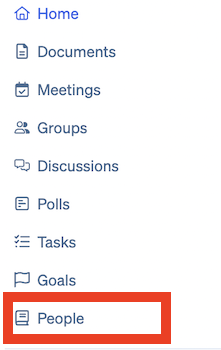
1. Click **People** from the main menu panel
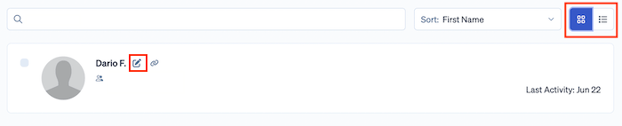
2. From *Grid view*, click **Edit** icon next to the desired user's name
1. *Edit Profile* page opens
2. From *List view:*
1. Click the desired user's name; user's People page opens

2. Click **Edit**
- *Edit Profile* page opens
3. Click the tabs at the top and left of this page to edit information
4. When finished editing, click **Save**
### II. Edit Settings for Own Account
To edit the settings of the account in use:
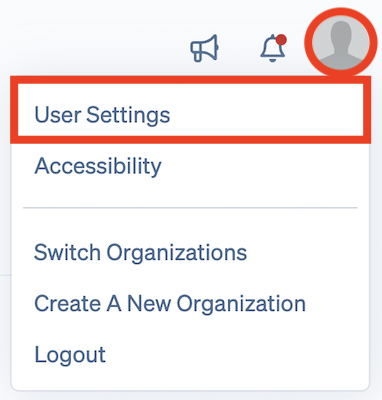
1. Click the gray silhouette or profile picture at the top right side of the screen
1. Options drop down
2. Click **User Settings**
1. *Edit Profile* page opens
3. Click the tabs at the top and left of this page to edit information
4. When finished editing, click **Save**
### **III. Information Editable by Admins Only**
Within the user's profile settings, there is certain information that only an Administrator can edit about a user within Boardable. This information includes the following:
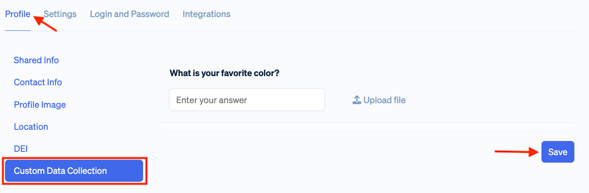
1. **Profile**
1. Custom data collection questions which are not set as *Visible to member*
1. To learn more about this, please see [Related Articles](https://docs.boardable.com/knowledge/edit-user-settings#related-articles)
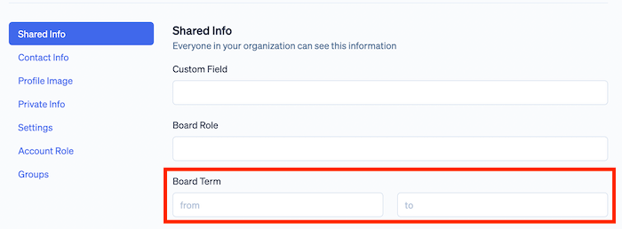
2. **Shared info**
1. *Board Term from and to*
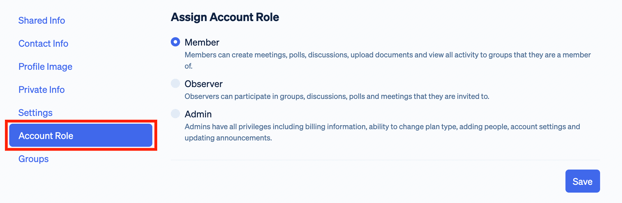
3. **Account Role**
1. Users do not see this tab
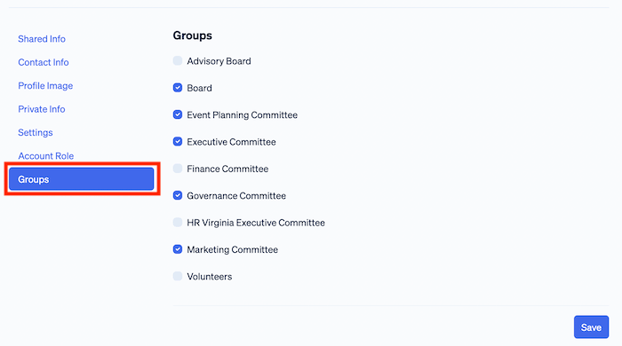
4. **Groups**
1. Users do not see this tab
### **IV. Information Editable by Users Only**
Members and Observers can only update their own profile.
Within the user's profile setting, there is certain information that only a user can edit about themselves. These are profile options that the Administrator cannot update for the user.
These options include the following (listed by tab):
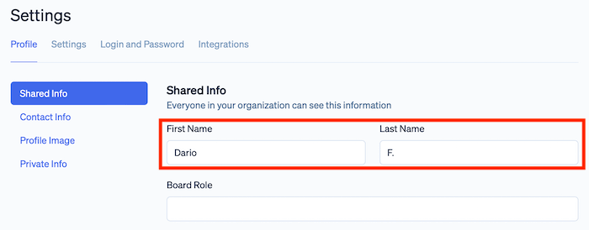
1. **Shared Info**
1. *First Name* and *Last Name*
1. Once the user has logged in to their account, the Administrator no longer has access to update this information
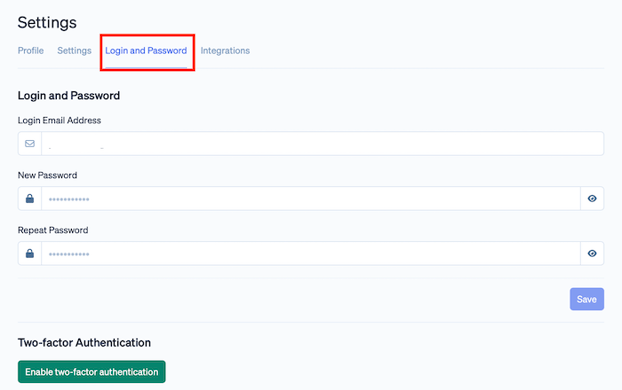
2. **Login and Password**
1. Once the user has logged in to their account, the Administrator no longer has access to update this information. The Administrator is only able to assign the login email address when creating the user. Administrators do not see this tab when editing a user (other than themselves).
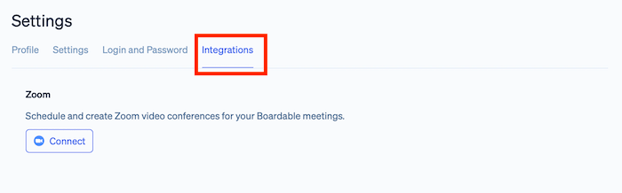
3. **Zoom Integration**
1. Administrators do not see this tab when editing a user (other than themselves)
### **IV. Information Editable by Administrators *&* Users**
***Note:*** *Email addresses editable by the administrator (contact and notification addresses) cannot be used for login, or to receive meeting invitations.*
There is also a fair amount of information in the user's profile that both the Administrator and the user themselves can update. This information includes the following (listed by tab):
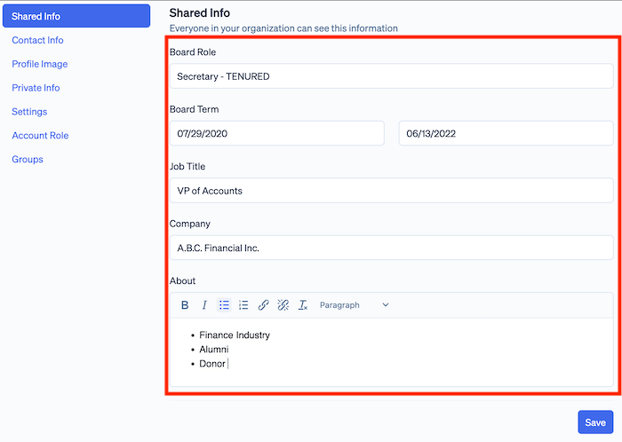
1. **About / About Me**
1. Board Role
2. Job Title
3. Company
4. About (description)
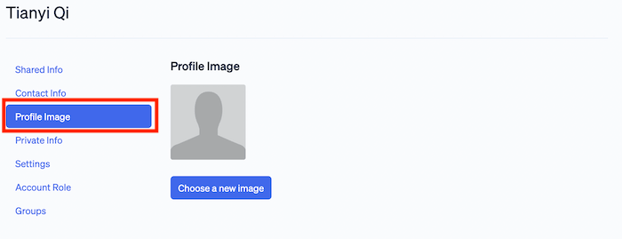
2. **Profile Image**
1. Administrators and users can see and update the same image in this tab
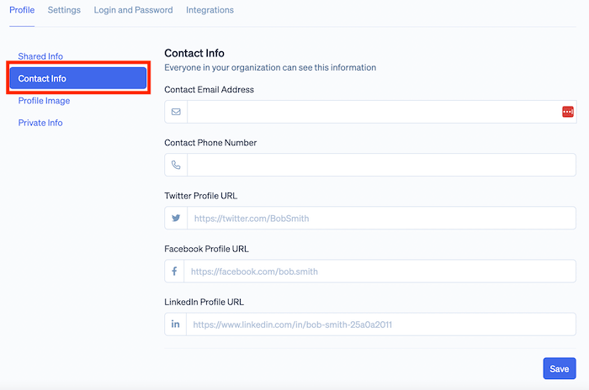
3. **Contact info**
1. Administrators and users can see and update the same information in this tab:
1. Contact email address
2. Contact Phone Number
3. Twitter Profile URL
4. Facebook Profile URL
5. Linkedin Profile URL
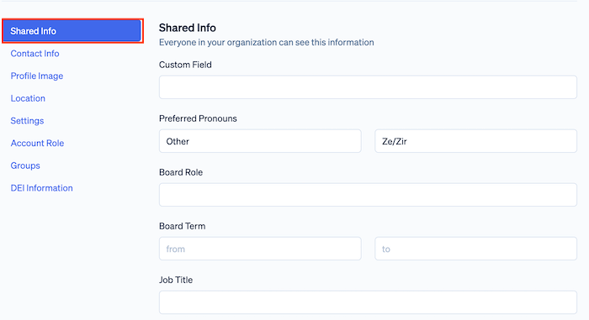
4. **Shared info**
1. Administrators and users can both see and update the following information in this tab:
1. Custom field
2. Pronouns
3. Board role
4. Board term
5. Job title
6. Company
7. About
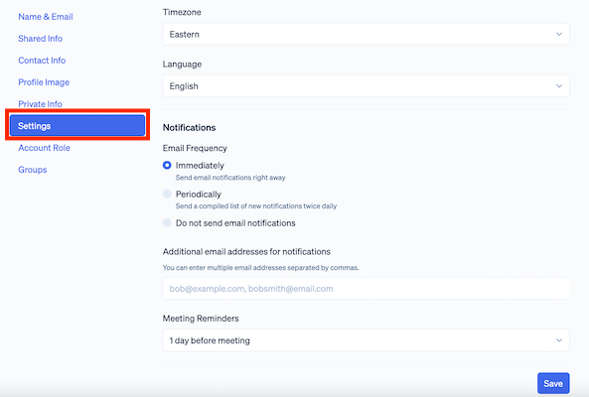
5. **Settings**
1. Administrators and users can see and update the same information in this tab:
1. Timezone
2. Language
3. Notification Frequency
4. Email addresses for additional notifications
5. Meeting reminders
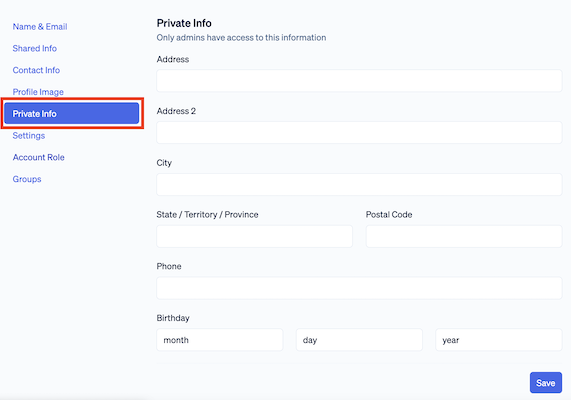
6. **Private info**
1. Users can only see and edit their own Private info tab
2. Administrators can see and update their own Private info tab *and* the Private info tab of other users
3. This includes the following information:
1. Address
2. Phone number
3. Birthday
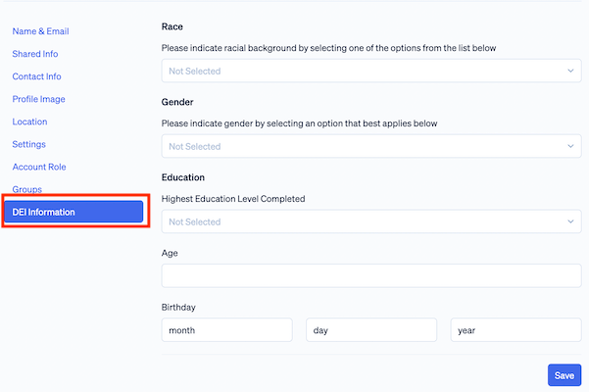
7. **DEI Information**
1. Users can only update their own DEI information
2. Administrators can update their own DEI information, and that of other users
3. This includes the following information:
1. Race
2. Gender
3. Education
4. Age
5. Date of birth
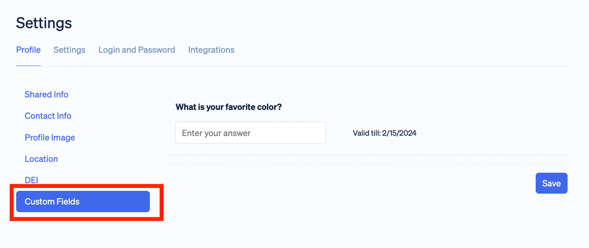
8. **Custom Data Collection**
1. Custom data collection questions which are set as *Visible to member*
1. To learn more about this, please see [Related Articles](https://docs.boardable.com/knowledge/edit-user-settings#related-articles)
---
### **Related Articles**
- [Account Roles and Permissions](https://docs.boardable.com/knowledge/account-roles-and-permissions?hsLang=en): learn about the different types of account roles and the associated permissions within Boardable
- [User Settings](https://docs.boardable.com/knowledge/view-user-settings?hsLang=en): learn how to change "about" info, profile image, contact info, login info, calendar integration, notifications, time zone, and more
- [Mobile — View & Edit User Settings](https://docs.boardable.com/knowledge/custom-data-fields-create-edit?hsLang=en): learn how to open user settings on the mobile app and make changes
- [Custom Data Fields — Create & Edit](https://docs.boardable.com/knowledge/custom-data-fields-create-edit?hsLang=en): Learn how to add a field to the settings of all users in an organization for any data wanted, and how to edit or deactivate this field
- [Complete Custom Data Fields](https://docs.boardable.com/knowledge/complete-custom-data-fields?hsLang=en): Learn how to fill out custom data fields for individual users
- [Boardable Overview](https://docs.boardable.com/knowledge/boardable-overview?hsLang=en#main-content)
- [Boardable Overview](https://docs.boardable.com/knowledge/boardable-overview?hsLang=en#boardable-overview)
- [Manage Your Subscription](https://docs.boardable.com/knowledge/boardable-overview?hsLang=en#manage-your-subscription)
- [Getting Started](https://docs.boardable.com/knowledge/getting-started?hsLang=en#main-content)
- [Quick Start Guides](https://docs.boardable.com/knowledge/getting-started?hsLang=en#quick-start-guides)
- [Login and Setup](https://docs.boardable.com/knowledge/getting-started?hsLang=en#login-and-setup)
- [Use Boardable Mobile](https://docs.boardable.com/knowledge/getting-started?hsLang=en#use-boardable-mobile)
- [Use Boardable Desktop](https://docs.boardable.com/knowledge/getting-started?hsLang=en#use-boardable-desktop)
- [Boardable Group Trainings](https://docs.boardable.com/knowledge/getting-started?hsLang=en#boardable-group-trainings)
- [Document Center](https://docs.boardable.com/knowledge/document-center?hsLang=en#main-content)
- [Manage Documents](https://docs.boardable.com/knowledge/document-center?hsLang=en#manage-documents)
- [Annotate and Edit Documents](https://docs.boardable.com/knowledge/document-center?hsLang=en#annotate-and-edit-documents)
- [Manage Document Signatures](https://docs.boardable.com/knowledge/document-center?hsLang=en#manage-document-signatures)
- [Meetings](https://docs.boardable.com/knowledge/meetings?hsLang=en#main-content)
- [Create and Configure Meetings](https://docs.boardable.com/knowledge/meetings?hsLang=en#create-and-configure-meetings)
- [Manage Meeting Invitees](https://docs.boardable.com/knowledge/meetings?hsLang=en#manage-meeting-invitees)
- [Create Meeting Agendas](https://docs.boardable.com/knowledge/meetings?hsLang=en#create-meeting-agendas)
- [Take Meeting Minutes](https://docs.boardable.com/knowledge/meetings?hsLang=en#take-meeting-minutes)
- [Use the Calendar](https://docs.boardable.com/knowledge/meetings?hsLang=en#use-the-calendar)
- [Agenda](https://docs.boardable.com/knowledge/meetings?hsLang=en#agenda)
- [Groups](https://docs.boardable.com/knowledge/groups?hsLang=en)
- [Discussions](https://docs.boardable.com/knowledge/discussions?hsLang=en)
- [Polls](https://docs.boardable.com/knowledge/polls?hsLang=en)
- [Tasks & Goals](https://docs.boardable.com/knowledge/tasks-goals?hsLang=en#main-content)
- [Tasks](https://docs.boardable.com/knowledge/tasks-goals?hsLang=en#tasks)
- [Goals](https://docs.boardable.com/knowledge/tasks-goals?hsLang=en#goals)
- [People](https://docs.boardable.com/knowledge/people?hsLang=en)
- [Notifications](https://docs.boardable.com/knowledge/notifications?hsLang=en)
- [Reports & Data](https://docs.boardable.com/knowledge/reports-data?hsLang=en#main-content)
- [Standard Reports](https://docs.boardable.com/knowledge/reports-data?hsLang=en#standard-reports)
- [Custom Data Reports](https://docs.boardable.com/knowledge/reports-data?hsLang=en#custom-data-reports)
- [Settings](https://docs.boardable.com/knowledge/settings?hsLang=en#main-content)
- [Accessibility Features](https://docs.boardable.com/knowledge/settings?hsLang=en#accessibility-features)
- [User Settings](https://docs.boardable.com/knowledge/settings?hsLang=en#user-settings)
- [Organization Settings](https://docs.boardable.com/knowledge/settings?hsLang=en#organization-settings)
- [Forms & Surveys](https://docs.boardable.com/knowledge/forms-surveys?hsLang=en)
- [Video Conferencing](https://docs.boardable.com/knowledge/video-conferencing?hsLang=en#main-content)
- [Use Boardable Video](https://docs.boardable.com/knowledge/video-conferencing?hsLang=en#use-boardable-video)
- [Use Zoom or Microsoft Teams](https://docs.boardable.com/knowledge/video-conferencing?hsLang=en#use-zoom-or-microsoft-teams)
- [Release Notes](https://docs.boardable.com/knowledge/release-notes?hsLang=en#main-content)
- [2026](https://docs.boardable.com/knowledge/release-notes?hsLang=en#2026)
- [2025](https://docs.boardable.com/knowledge/release-notes?hsLang=en#2025)
- [Public Site](https://docs.boardable.com/knowledge/public-site?hsLang=en)
- [Motions & Votes](https://docs.boardable.com/knowledge/motions-votes?hsLang=en)
[](https://boardable.com/)
Boardable Help Center
Copyright © 2025, Boardable
```json
{
"@context" : "https://schema.org",
"@type" : "VideoObject",
"contentUrl" : "https://stream.mux.com/kGF02rqIYa3ZHvNlSagaG7MX01zMKmcbXjHkckBziZ00OQ/capped-1080p.mp4",
"dateModified" : "2025-03-12T15:02:32.772Z",
"duration" : "PT1M51S",
"height" : 1080,
"name" : "Editing Another Users Settings - Admin",
"thumbnailUrl" : "https://4073229.fs1.hubspotusercontent-na1.net/hubfs/4073229/CS%20Videos/Videos%20in%20Support%20Articles/Editing%20Another%20Users%20Settings%20-%20Admin.mp4/medium.jpg",
"uploadDate" : "2025-03-12T15:02:14.147Z",
"width" : 1920
}
```
```json
{
"@context" : "https://schema.org",
"@type" : "VideoObject",
"contentUrl" : "https://stream.mux.com/201PB00NNutF8on00Orq2JN7DZ7lq49KNQ89ks1yaf4W1w/capped-1080p.mp4",
"dateModified" : "2025-05-01T15:19:56.562Z",
"duration" : "PT1M20S",
"height" : 1080,
"name" : "5.1.25Editing Your User Settings (1)",
"thumbnailUrl" : "https://4073229.fs1.hubspotusercontent-na1.net/hubfs/4073229/5.1.25Editing%20Your%20User%20Settings%20(1).mp4/medium.jpg",
"uploadDate" : "2025-05-01T15:19:46.849Z",
"width" : 1920
}
```